
Estimating guide
How to use a pressure washing estimate calculator
Use this guide to decide what to enter into an estimate calculator before you send a customer quote. A good workflow protects labor, materials, travel, overhead, margin, and minimum fees before you turn the work into customer-ready scope.
Quick answer
A pressure washing estimate calculator should help a contractor turn job details into a defensible customer price. The minimum useful inputs are service type, square footage or linear footage, soil level, labor time, loaded labor rate, chemicals, travel, setup, overhead, minimum job fee, discount, and target margin. The customer output should show scope, package options, exclusions, terms, and total price while hiding internal cost and margin.
What a pressure washing estimate calculator should do
The job of an estimate calculator is to turn job assumptions into a price you can defend. For a pressure washing contractor, those assumptions include more than the surface area. You also need to account for production speed, setup time, chemicals, travel, equipment wear, overhead, discounts, and the minimum fee that makes a job worth scheduling.
The calculator should keep internal math private. A customer does not need to see your crew cost, profit target, or margin. They need a clear scope of work, package options, total price, scheduling assumptions, exclusions, terms, and a way to approve or discuss the estimate.
Use the live calculator when you already have job details
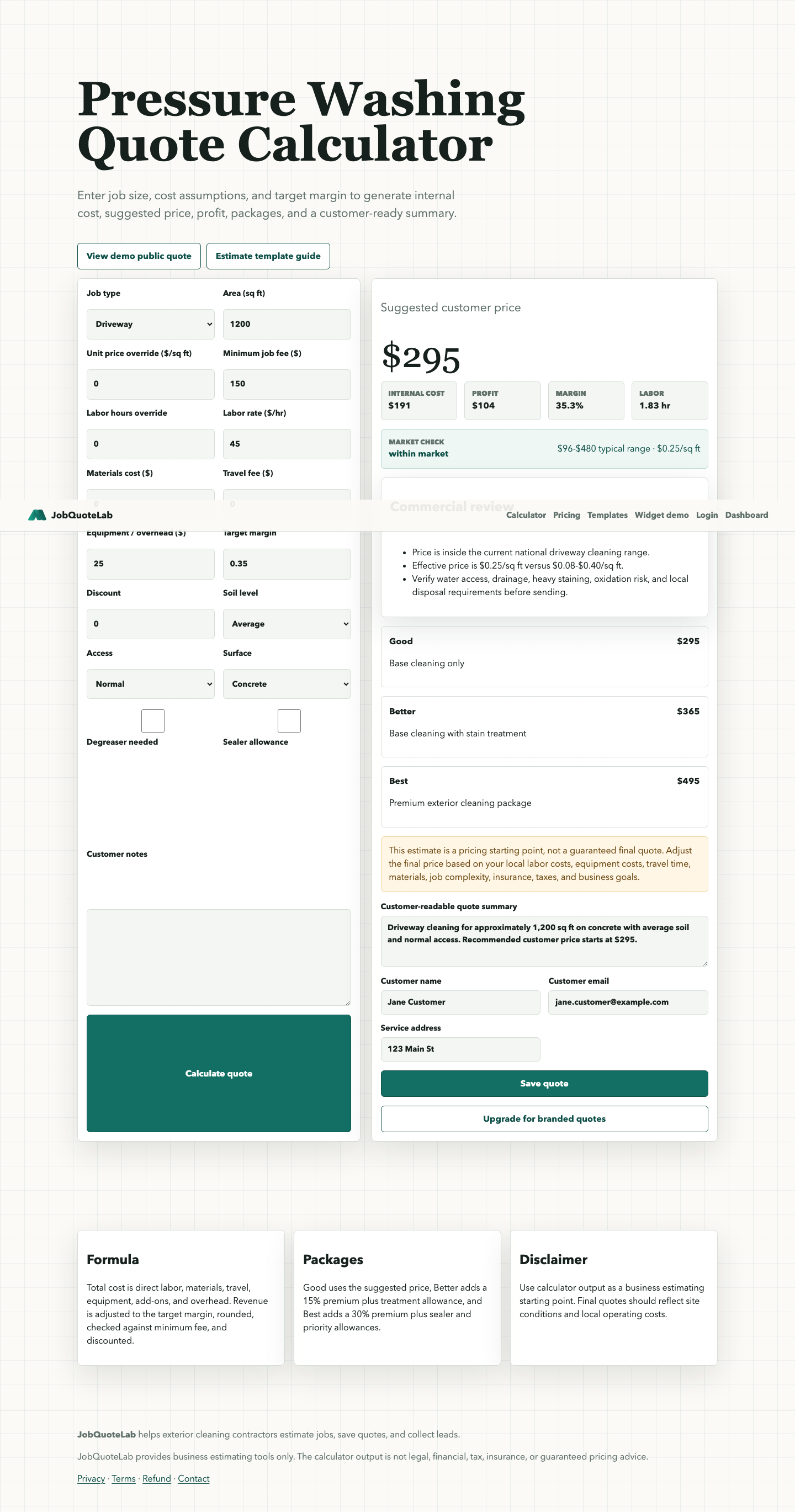
This guide explains the inputs, but the calculator is the fastest path when you already know the service type, approximate area, soil level, access, and target margin. Enter the job details, review the suggested customer price, then decide whether to copy, print, preview, email, or save the customer-safe quote. If your team still prices in Sheets, compare the estimate calculator and spreadsheet workflows before changing tools.
- Use the guide when you are deciding which fields matter before quoting.
- Use the calculator when you have a real driveway, patio, house wash, or soft wash job to price.
- Use the templates when the customer expects a printable bid or reusable spreadsheet file.
Inputs to collect before estimating
Job details
- Service type: driveway, siding, roof soft wash, deck, fence, gutter brightening, or custom work.
- Surface size: square footage, linear footage, or another unit that matches the job.
- Surface condition: normal soil, heavy organic growth, oil staining, oxidation, or fragile material.
- Access: water source, parking, hose run, slope, drainage, obstacles, and customer prep needs.
Business details
- Labor rate and expected production time.
- Chemicals, fuel, equipment wear, and disposal or cleanup cost.
- Travel time, setup, admin, insurance, and overhead allocation.
- Target margin, discount rules, and minimum job fee.
Simple estimate formula
Use this workflow as a starting point:
- Total job cost = labor + materials + travel + equipment + overhead + add-ons.
- Target revenue = total job cost divided by one minus target margin.
- Customer price = the higher of target revenue or your minimum job fee, adjusted for package choices and discounts.
Example: if a job has $150 in total cost and you want a 45% margin, the target revenue is about $273. If your minimum job fee is $300, the estimate should start at $300 before any package upgrade or discount.
This is not a universal price. It is a way to avoid guessing. Final quotes still need judgment for local costs, site conditions, safety, taxes, insurance, and business goals.
Estimate versus quote
An estimate is the internal pricing decision. A quote is the customer-facing offer. JobQuoteLab separates those two views so you can think clearly about cost and margin while still presenting a clean customer document.
Internal estimate
Cost, margin, profit, minimum fee, labor hours, materials, and operating assumptions.
Customer quote
Scope, package options, line items, exclusions, terms, expiration date, and total price.
Follow-up
Public quote link, print-ready estimate, and simple wording for customer questions.
When to override the calculator
Override the result when the site has unusual constraints: poor water access, steep terrain, heavy oil restoration, oxidation risk, fragile siding, long hose runs, limited parking, or cleanup requirements that are not reflected in the default assumptions.
The calculator should make the starting point faster. It should not replace contractor judgment or an on-site review when the job is complex. If the photos leave too many unknowns, check when to visit before quoting before you lock the price.
Common calculator mistakes to avoid
Quoting from square footage alone
Square footage is only one input. Labor speed, access, setup, chemicals, travel, and minimum job fee often move the final price more than area does.
Showing internal margin to customers
Keep profit, margin, loaded labor rate, and material assumptions in the internal estimate. Send customers the scope, terms, packages, and total.
Discounting below the trip floor
Small jobs still need setup and travel. A calculator should protect your minimum fee before any discount or package adjustment.
Next step
Open the live free pressure washing estimate calculator, enter a real job scenario, then compare the suggested price with your minimum fee and target margin. After that, save or print the customer-safe version. When the work is finished, use a post-job costing review to compare the estimate with actual crew time and cost before changing the next quote.